
Introduction
GeoLog started with a simple premise: what’s near me right now? Every feature in the app flows from that question — the gallery sorts by proximity, the nearby locations list updates as you move, and the whole workflow is built for the moment before you grab your gear and head out the door.
That premise worked fine early on. Then my test library grew past 100 locations, and I started noticing something on my iPhone 11 test device: the Nearby Locations list was getting sluggish. Not broken — just slow enough to feel wrong.
The naive approach — sorting by latitude and longitude directly — doesn’t actually measure distance. It’s fast, but it’s wrong. A degree of longitude in Texas is not the same distance as a degree of longitude in Alaska. The app’s entire reason for existing is proximity, so sorting by proximity correctly isn’t optional. I needed geodesic distance calculations — the real math — running fast enough that a growing location library wouldn’t penalize the user.
That’s what led me to Rust.
Table of Contents
What Is Rust?
At its core, Rust is a modern systems programming language designed for two things that rarely go together: raw performance and memory safety.
Most languages force a tradeoff. C and C++ are fast — as close to the metal as you can get without writing assembly — but memory management is entirely manual. A misplaced pointer, a use-after-free, a buffer overrun: these bugs are notoriously hard to find and can cause crashes that are nearly impossible to reproduce. Languages like Swift, Python, or Java take the opposite approach — automatic memory management keeps you safe, but the runtime cost is real. Swift’s Automatic Reference Counting (ARC) is efficient, but it’s still work the CPU is doing on your behalf while your app is running.
Rust takes a different path entirely. It enforces memory safety at compile time through a system called ownership — a set of rules the compiler checks before your code ever runs. There is no garbage collector, no ARC, no runtime cleanup. If your code compiles, the compiler has already verified it won’t leak memory or cause a data race. You get C-level performance with the safety guarantees of a managed language.
For computationally intensive work — geodesic distance calculations, celestial mechanics, floating-point optics math — that combination is exactly what you want.
How Rust Talks to Swift
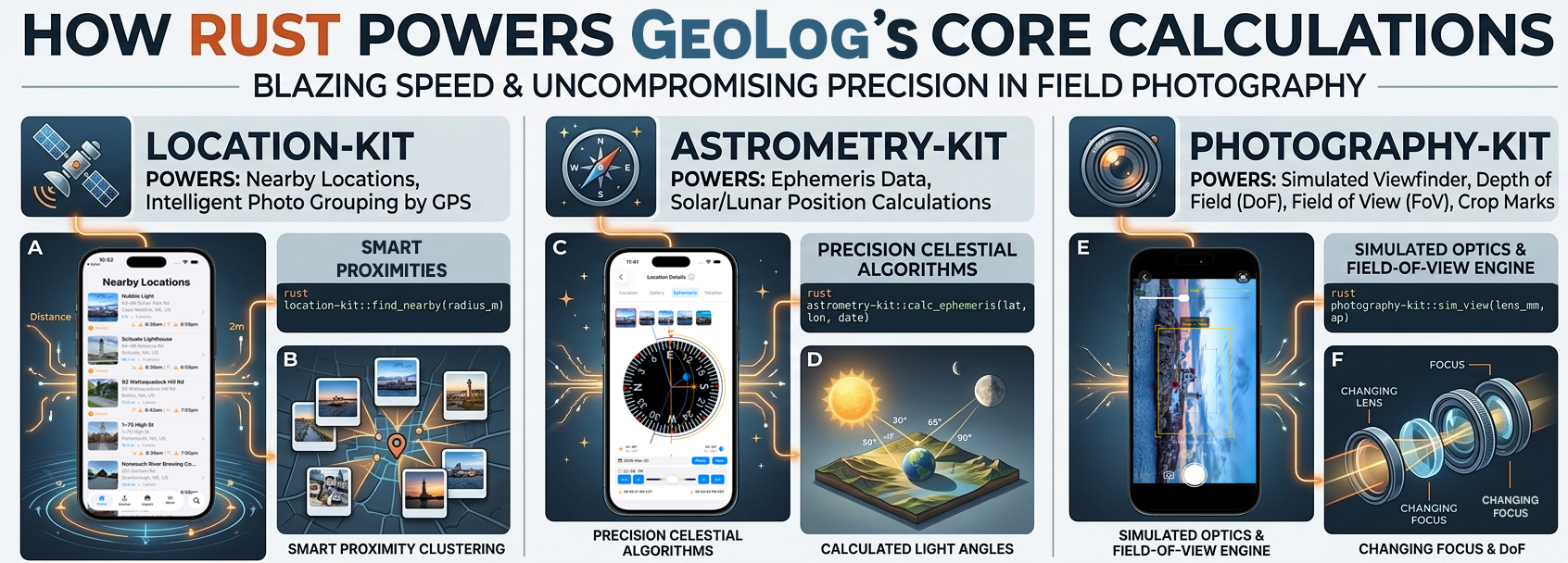
GeoLog’s UI is written in SwiftUI. The maps, the gallery, the ephemeris compass — all Swift. But when the app needs to calculate the position of the moon or sort 200 locations by geodesic distance, Swift hands that work to Rust.
The bridge between them is a C-compatible Foreign Function Interface (FFI). Each Rust library exposes a set of functions with a C-compatible signature, and a tool called cbindgen generates the corresponding C header files automatically. On the Swift side, a thin wrapper file calls those functions as if they were native — the complexity of the bridge is invisible to the rest of the app.
The compiled Rust code becomes a static library that links directly into the Xcode project. At runtime there’s no inter-process communication, no network call, no serialization overhead — Swift calls into Rust the same way it calls into any C library, and the result comes back in the same function call.
Why It Matters in Practice
The practical benefits show up in three ways in GeoLog:
Predictable performance. Rust has no runtime memory management to interrupt execution. When a user drags the aperture slider in the simulated viewfinder, the depth of field recalculates without any hidden pauses for cleanup. The math is deterministic — the same input always takes the same time.
Correct math at scale. Geodesic distance calculations, ephemeris algorithms, and optics formulas are numerically intensive. Rust’s performance headroom means those calculations stay fast as the location library grows, without compromising on correctness to hit a speed target.
Safety without overhead. The ownership model means memory bugs that would be subtle and dangerous in C are caught at compile time. That confidence matters when the same library runs on every device from an iPhone 11 to the latest hardware.
The Problem: Proximity Is Harder Than It Looks
The first version of GeoLog’s nearby sort was simple: take every location in the library, subtract the current latitude and longitude from each one, and rank by the result. It worked — or at least it appeared to. On a small library with a handful of locations, the ordering looked reasonable and the performance was fine.
Both of those things turned out to be partially wrong.
Why Lat/Lon Sorting Fails
Latitude and longitude are angles, not distances. A degree of latitude is roughly 69 miles everywhere on Earth — that part is consistent. But a degree of longitude shrinks as you move toward the poles. At the equator, one degree of longitude is about 69 miles. In Dallas, it’s closer to 57 miles. In Anchorage, it’s under 30 miles. Sort by raw coordinate difference and you’re not sorting by distance — you’re sorting by something that approximates distance near the equator and gets progressively less accurate as you move north or south.
For a photography scouting app used by people anywhere on the planet, “approximately correct near the equator” isn’t a design goal.
Haversine Distance: The Real Math
The correct calculation is haversine distance — a formula that treats the Earth as a sphere and calculates the great-circle distance between two points. It’s accurate to within about 0.5%, which over any practical photography scouting radius is well under a mile of error. For deciding whether a lighthouse is closer than a state park, that’s more than sufficient — and it’s correct regardless of where on Earth the user is standing.
What “Fast Enough” Actually Means at Scale
With a small location library — say, 20 or 30 entries — even an inefficient distance calculation is invisible. The math runs in microseconds and the list snaps into order before the user notices anything.
Past 100 locations on an iPhone 11, that changes. The device is several generations old, the CPU is slower than current hardware, and I test on it deliberately — if it feels right on an 11, it feels right everywhere. What I was seeing wasn’t a catastrophic freeze, just a perceptible lag on every location update as the app recalculated sort order for the entire library.
The fix wasn’t to sort less often or cache stale results. The sort is the feature. What I needed was the same correct calculation, running fast enough that the library size stopped mattering.
Why Not Just Fix the Swift?
It’s a fair question. Swift is a fast, modern language — Apple has invested heavily in its performance, and for most iOS workloads it’s more than capable. Before reaching for a new tool and a new language, it’s worth asking whether the problem can be solved with what’s already there.
The short answer is: yes, you can write geodesic distance calculations in Swift. The math isn’t language-specific. But the decision to move to Rust wasn’t just about whether Swift could do it — it was about what the right home for that code actually is.
The Profiler Told Part of the Story
When the Nearby Locations list started feeling sluggish, the first stop was Instruments. The CPU profile was unsurprising: the sort was the bottleneck, and the bottleneck was the distance calculation running on every location in the library on every position update. The fix seemed straightforward — optimize the calculation, reduce unnecessary recalculation, maybe cache results where the user hasn’t moved significantly.
Those optimizations helped. But they were treating a symptom. The underlying issue was that this kind of work — tight numerical loops, no UI involvement, no framework dependencies — isn’t what Swift is optimized for. Swift is designed for building apps. Its performance envelope is shaped around that use case: view rendering, data binding, event handling, framework integration. It’s excellent at all of those things. Pure numerical computation in a hot loop is a different workload.
ARC Gets in the Way
Swift’s Automatic Reference Counting is one of its strengths — it handles memory management automatically without the pauses of a garbage collector. But ARC isn’t free. Every object that enters and leaves scope carries reference counting overhead. In a tight calculation loop processing hundreds of locations, that overhead adds up in ways that are hard to profile and harder to eliminate without restructuring the code significantly.
Rust has none of that. Memory is managed entirely at compile time. The distance calculation runs without any runtime memory management overhead, and the performance is consistent regardless of library size or device generation.
The Reusability Argument
There was a second consideration beyond raw performance: these calculations don’t belong to iOS.
Geodesic math, celestial mechanics, optics formulas — none of this is platform-specific. Writing it in Swift ties it to Apple’s toolchain. Writing it in Rust means the same library can run on Android, on a server, in a command-line tool, anywhere. GeoLog is an iOS app today, but the math underneath it shouldn’t have to be rewritten if that ever changes.
That reusability has already proven out in practice. GeoReturn — a precision GPS waypoint navigation app — uses location-kit for the same geodesic calculations. And as a proof of concept, I built a Flutter/Dart prototype of GeoReturn that calls the same Rust library through Dart FFI. Three different app contexts, three different language layers, one shared Rust core. The math didn’t change — only the bridge did.
The Decision
Rewriting the distance calculations in Rust wasn’t the path of least resistance. It meant learning a new toolchain, setting up the FFI bridge, integrating static libraries into Xcode, and maintaining code in two languages. None of that is trivial.
But it was the right architectural decision. The performance improvement on the iPhone 11 was immediate and measurable. And once the FFI bridge was in place for location-kit, adding astrometry-kit and photography-kit was straightforward — the hard infrastructure work was already done.
Sometimes the right fix isn’t optimizing what you have. It’s putting the work where it belongs.
The FFI Architecture: How Swift Calls Rust
FFI stands for Foreign Function Interface — a mechanism that lets one programming language call code written in another. In GeoLog’s case, it’s the bridge that lets Swift hand a latitude, longitude, and search radius to a Rust function and get back a sorted list of nearby locations, all within a single function call.
The architecture is straightforward once it’s in place, but getting there requires a few moving pieces working together.
The Rust Side: Exporting a C-Compatible Interface
Rust can’t talk directly to Swift — but both languages can talk to C. The FFI bridge uses C as a common language, which means the Rust libraries expose their public functions using C-compatible types and calling conventions.
Here’s the actual distance function from location-kit’s FFI layer:
#[no_mangle]
pub extern "C" fn lk_haversine_distance(
    lat1: f64,
    lon1: f64,
    lat2: f64,
    lon2: f64,
) -> f64 {
    haversine_distance(lat1, lon1, lat2, lon2)
}
A few things are happening here:
#[no_mangle]tells the Rust compiler not to rename the function during compilation — C and Swift need to find it by its exact nameextern "C"tells Rust to use the C calling convention for this function- The FFI function is a thin wrapper — it delegates immediately to the pure Rust implementation in
lib.rs, keeping the FFI layer clean and the core logic testable without any FFI involvement
For bulk operations, location-kit defines C-compatible structs using #[repr(C)] to ensure the memory layout matches what Swift expects:
#[repr(C)]
#[derive(Debug, Copy, Clone)]
pub struct LKCoordinate {
    pub latitude: f64,
    pub longitude: f64,
}

#[repr(C)]
pub struct LKIndexArray {
    pub indices: *mut usize,
    pub count: usize,
}
The sort-by-distance FFI function takes a pointer to an array of LKCoordinate structs and returns a LKIndexArray of sorted indices:
#[no_mangle]
pub extern "C" fn lk_sort_indices_by_distance(
    coords: *const LKCoordinate,
    count: usize,
    from_lat: f64,
    from_lon: f64,
) -> LKIndexArray {
    if coords.is_null() || count == 0 {
        return LKIndexArray {
            indices: std::ptr::null_mut(),
            count: 0,
        };
    }

    let coord_slice = unsafe { std::slice::from_raw_parts(coords, count) };
    let coord_tuples: Vec<(f64, f64)> = coord_slice
        .iter()
        .map(|c| (c.latitude, c.longitude))
        .collect();

    let mut sorted = crate::sort_indices_by_distance(&coord_tuples, from_lat, from_lon);
    sorted.shrink_to_fit();
    let ptr = sorted.as_mut_ptr();
    let len = sorted.len();
    std::mem::forget(sorted);

    LKIndexArray { indices: ptr, count: len }
}
One important detail: memory allocated by Rust must be freed by Rust. The caller is responsible for passing the returned array back to a matching free function when done:
#[no_mangle]
pub extern "C" fn lk_free_index_array(array: LKIndexArray) {
    if !array.indices.is_null() && array.count > 0 {
        unsafe {
            Vec::from_raw_parts(array.indices, array.count, array.count);
        }
    }
}
This pattern — allocate in Rust, free in Rust — keeps memory ownership clear across the language boundary.
cbindgen: Generating the C Header Automatically
Once the Rust functions are exported, Swift needs to know they exist and what their signatures look like. That’s the job of cbindgen — a tool that reads your Rust source and generates a C header file (.h) automatically.
Running cbindgen on location-kit produces declarations like:
double lk_haversine_distance(double lat1, double lon1, double lat2, double lon2);
double lk_bearing(double from_lat, double from_lon, double to_lat, double to_lon);
const char *lk_compass_direction(double degrees);
LKIndexArray lk_sort_indices_by_distance(const LKCoordinate *coords,
                                          size_t count,
                                          double from_lat,
                                          double from_lon);
void lk_free_index_array(LKIndexArray array);
That header gets added to the Xcode project and tells the compiler exactly how to call the Rust functions. From Xcode’s perspective it looks like any other C library.
The Static Library and XCFramework
The Rust code compiles to a static library — a .a file — for each target architecture. GeoLog needs to run on both physical devices (ARM64) and the simulator (ARM64 on Apple Silicon Macs), so the build process produces separate libraries for each target and combines them into a single XCFramework using lipo.
That XCFramework drops into the Xcode project like any other framework dependency. Xcode links it at build time and the functions are available at runtime with no dynamic loading, no separate process, no overhead beyond the function call itself.
The Swift Wrapper: Hiding the Complexity
Calling raw C functions from Swift works, but it’s not pleasant. Raw pointers, manual memory management, C types — none of that fits naturally into a SwiftUI codebase. The solution is a thin Swift wrapper that translates between the C interface and idiomatic Swift.
For location-kit that wrapper handles the pointer mechanics and memory cleanup so the rest of the app never sees them:
func sortedIndicesByDistance(
    from coordinate: CLLocationCoordinate2D,
    locations: [CLLocationCoordinate2D]
) -> [Int] {
    var coords = locations.map {
        LKCoordinate(latitude: $0.latitude, longitude: $0.longitude)
    }
    let result = coords.withUnsafeMutableBufferPointer { buffer in
        lk_sort_indices_by_distance(
            buffer.baseAddress,
            buffer.count,
            coordinate.latitude,
            coordinate.longitude
        )
    }
    defer { lk_free_index_array(result) }
    return Array(UnsafeBufferPointer(start: result.indices, count: result.count))
}
The rest of the app never sees the FFI boundary. From SwiftUI’s perspective it’s calling a Swift function that returns Swift types. The Rust layer is completely invisible.
One Bridge, Three Libraries
Once the FFI infrastructure was in place for location-kit, adding astrometry-kit and photography-kit followed the same pattern:
- Write the Rust library with
#[no_mangle]exported functions - Run cbindgen to generate the C header
- Compile to XCFramework for all target architectures
- Write a Swift wrapper to expose idiomatic Swift APIs
The hard work — understanding the toolchain, setting up the build scripts, integrating XCFrameworks into Xcode — only had to be done once. Each additional library was an incremental addition, not a new architecture problem.
location-kit: Smart Proximity at Scale
location-kit is the foundation of GeoLog’s core promise — sorting everything by what’s closest to you right now. It handles four things: haversine distance calculations, bearing and compass direction, bulk distance operations, and magnetic declination via the World Magnetic Model (WMM).
Haversine Distance: The Right Math for the Job
The core of location-kit is haversine_distance — the function that everything else builds on:
pub fn haversine_distance(lat1: f64, lon1: f64, lat2: f64, lon2: f64) -> f64 {
    let lat1_rad = lat1 * PI / 180.0;
    let lon1_rad = lon1 * PI / 180.0;
    let lat2_rad = lat2 * PI / 180.0;
    let lon2_rad = lon2 * PI / 180.0;

    let dlat = lat2_rad - lat1_rad;
    let dlon = lon2_rad - lon1_rad;

    let a = (dlat / 2.0).sin().powi(2)
        + lat1_rad.cos() * lat2_rad.cos() * (dlon / 2.0).sin().powi(2);

    let c = 2.0 * a.sqrt().atan2((1.0 - a).sqrt());

    EARTH_RADIUS_M * c
}
As covered earlier, haversine treats the Earth as a sphere and calculates great-circle distance between two points. It’s accurate to within about 0.5% — well under a mile over any practical photography scouting radius — and correct regardless of where on Earth the user is standing. For GeoLog’s use case it’s the right tradeoff: accurate enough to matter, fast enough to run on every location update.
Sorting by Proximity
The function that directly solved the performance problem is sort_indices_by_distance. Rather than returning a sorted copy of the location array — expensive with large libraries — it returns a sorted array of indices into the original:
pub fn sort_indices_by_distance(
    coords: &[(f64, f64)],
    from_lat: f64,
    from_lon: f64
) -> Vec<usize> {
    let mut indexed: Vec<(usize, f64)> = coords
        .iter()
        .enumerate()
        .map(|(i, &(lat, lon))| {
            let dist = haversine_distance(from_lat, from_lon, lat, lon);
            (i, dist)
        })
        .collect();

    indexed.sort_by(|a, b| a.1.partial_cmp(&b.1).unwrap_or(std::cmp::Ordering::Equal));

    indexed.iter().map(|&(i, _)| i).collect()
}
Swift holds the location data. Rust receives coordinates, computes distances, sorts, and returns indices. The location objects themselves never cross the FFI boundary — only the lightweight coordinate pairs go in, and a sorted index array comes back. This keeps the data transfer minimal and the memory ownership clean.
Bearing and Compass Direction
location-kit also handles bearing calculations — the direction from one point to another — which feeds GeoLog’s directional display:
pub fn bearing(from_lat: f64, from_lon: f64, to_lat: f64, to_lon: f64) -> f64 {
    let lat1 = from_lat * PI / 180.0;
    let lon1 = from_lon * PI / 180.0;
    let lat2 = to_lat * PI / 180.0;
    let lon2 = to_lon * PI / 180.0;

    let dlon = lon2 - lon1;
    let y = dlon.sin() * lat2.cos();
    let x = lat1.cos() * lat2.sin() - lat1.sin() * lat2.cos() * dlon.cos();

    let bearing_rad = y.atan2(x);
    let mut degrees = bearing_rad * 180.0 / PI;
    degrees = (degrees + 360.0).rem_euclid(360.0);
    degrees
}
A bearing in degrees maps to a compass direction via a 16-point compass rose — N, NNE, NE, ENE through the full 360°:
pub fn compass_direction(degrees: f64) -> &'static str {
    const DIRECTIONS: [&str; 16] = [
        "N", "NNE", "NE", "ENE", "E", "ESE", "SE", "SSE",
        "S", "SSW", "SW", "WSW", "W", "WNW", "NW", "NNW",
    ];
    let normalized = degrees.rem_euclid(360.0);
    let index = ((normalized + 11.25) / 22.5) as usize % 16;
    DIRECTIONS[index]
}
Note that compass_direction returns &'static str — a pointer to a string that lives for the lifetime of the program. That’s what makes the FFI version safe to return as a raw *const c_char without any memory allocation or cleanup on the caller’s side.
Magnetic Declination
location-kit also exposes magnetic declination via the WMM (World Magnetic Model) Rust crate — the same international standard used by aviation and navigation systems. This is what powers GeoLog’s magnetic-to-true north heading conversion:
pub fn magnetic_declination(
    lat: f64,
    lon: f64,
    _altitude_m: f64,
    year_fraction: f64
) -> f64 {
    let year = year_fraction.floor() as i32;
    let days_in_year = if (year % 4 == 0 && year % 100 != 0)
        || year % 400 == 0 { 366.0 } else { 365.0 };
    let day_of_year = ((year_fraction.fract() * days_in_year)
        .round() as i16).clamp(1, days_in_year as i16);
    let date = time::Date::from_ordinal_date(year, day_of_year as u16)
        .unwrap_or(time::Date::from_ordinal_date(2024, 1).unwrap());
    match wmm::declination(date, lat as f32, lon as f32) {
        Ok(d) => d as f64,
        Err(_) => 0.0,
    }
}
The _altitude_m parameter is reserved — the WMM crate currently ignores altitude, but the signature is forward-compatible if that changes. Positive values indicate east declination, negative values west — add declination to a magnetic heading to get true heading.
One Library, Three Consumers
location-kit has no iOS dependencies. It’s pure computation behind a C FFI boundary, which means it runs unchanged under three different language layers: SwiftUI in GeoLog, SwiftUI in GeoReturn, and Dart in a Flutter proof-of-concept of GeoReturn. The math is the same in all three — only the bridge changes.
astrometry-kit: Celestial Math That Can’t Be Wrong
If location-kit is about where you are, astrometry-kit is about when to be there. It calculates the position of the sun and moon in the sky, when they rise and set, the quality of light at any moment of the day, and handles the edge cases that most photography apps ignore entirely — like what happens when you’re scouting locations above the Arctic Circle.
The Core Data Model
astrometry-kit is built around a SolarCalculator that works in Julian Day (JD) numbers — a continuous count of days since January 1, 4713 BC used throughout astronomy as a timezone-neutral time representation. All calculations take a Julian Day as input and return Julian Days for event times. The FFI layer provides a conversion function so Swift can translate from calendar dates:
#[no_mangle]
pub extern "C" fn pk_julian_day(
    year: i32, month: i32, day: i32, hour: f64
) -> f64 {
    crate::astronomy::SolarCalculator::julian_day(year, month, day, hour)
}
Position results come back as CSunPosition structs — the same type is used for both sun and moon since the data they carry is identical:
#[repr(C)]
#[derive(Debug, Clone, Copy)]
pub struct CSunPosition {
    pub azimuth: f64,
    pub altitude: f64,
    pub right_ascension: f64,
    pub declination: f64,
}
azimuth is the compass bearing (0–360°, 0 = North), altitude is the angle above the horizon, and right_ascension / declination are the equatorial coordinates — useful for identifying where in the sky a body will appear regardless of observer location.
Sun and Moon Position
The position functions take a Julian Day and observer coordinates and return the body’s current position in the sky:
#[no_mangle]
pub extern "C" fn pk_sun_position(
    jd: f64, latitude: f64, longitude: f64
) -> CSunPosition {
    let pos = crate::astronomy::SolarCalculator::sun_position(jd, latitude, longitude);
    CSunPosition {
        azimuth: pos.azimuth,
        altitude: pos.altitude,
        right_ascension: pos.right_ascension,
        declination: pos.declination,
    }
}
The moon position function has the same signature — pk_moon_position — and returns the same struct. GeoLog uses these to drive the ephemeris compass: the altitude-projected dome arcs that show the sun and moon’s path across the sky for a given location and date.
Rise and Set Times
Basic sunrise, sunset, moonrise, and moonset are straightforward — pass a Julian Day representing the target date and observer coordinates, get back a Julian Day for the event time, or -1.0 if the event doesn’t occur:
#[no_mangle]
pub extern "C" fn pk_sunrise(jd: f64, latitude: f64, longitude: f64) -> f64 {
    crate::astronomy::SolarCalculator::sun_rise_set(jd, latitude, longitude, true)
        .unwrap_or(-1.0)
}
Solar events — sunrise, sunset, solar noon, civil dawn/dusk, nautical dawn/dusk — are all available in a single call via pk_solar_events, which returns a CSolarEvents struct with all times as Julian Days:
#[repr(C)]
#[derive(Debug, Clone, Copy)]
pub struct CSolarEvents {
    pub sunrise: f64,
    pub sunset: f64,
    pub solar_noon: f64,
    pub civil_dawn: f64,
    pub civil_dusk: f64,
    pub nautical_dawn: f64,
    pub nautical_dusk: f64,
}
Civil twilight — the period when the sun is between 0° and 6° below the horizon — is the golden hour window photographers care most about. Nautical twilight extends that to 12° below the horizon, covering the blue hour. Having all of these in a single FFI call keeps the Swift side clean.
The Hard Problem: Polar Regions
This is where astrometry-kit earns its complexity. Standard rise/set algorithms assume the sun rises and sets every day. Above the Arctic Circle — or below the Antarctic Circle — that assumption breaks down. During polar summer the sun never sets. During polar winter it never rises. A photography app used anywhere on Earth has to handle both cases correctly.
astrometry-kit solves this with a bracketing search approach. Rather than assuming a rise or set exists on the target date, it first checks whether the body’s altitude ever crosses the horizon during the day using find_daily_extremes. If the maximum altitude stays below the horizon threshold, it’s polar night. If the minimum altitude stays above it, it’s midnight sun. Only if neither sentinel applies does it search for the actual crossing:
#[no_mangle]
pub extern "C" fn astrometry_sunrise_before_or_on(
    jd: f64, latitude: f64, longitude: f64
) -> f64 {
    let (max_alt, min_alt) = crate::astronomy::SolarCalculator::find_daily_extremes(
        jd, latitude, longitude, false
    );
    if max_alt < -0.833 { return -2.0; } // polar night — sun never rises
    if min_alt > -0.833 { return -3.0; } // midnight sun — sun never sets

    for day_offset in 0..=7_i32 {
        let search_jd = jd - day_offset as f64;
        if let Some(result) = crate::astronomy::SolarCalculator::sun_rise_set(
            search_jd, latitude, longitude, true
        ) {
            return result;
        }
    }
    -1.0
}
The sentinel values are meaningful: -2.0 means polar night, -3.0 means midnight sun, -1.0 means no crossing found within the 7-day search window. The Swift wrapper maps all negative values to nil via a simple guard, but the distinction is available if the UI needs to explain why no rise or set time is shown.
The threshold of -0.833° accounts for atmospheric refraction and the angular diameter of the sun — the standard correction used in almanac calculations for when the upper limb of the sun appears on the horizon.
The same bracketing pattern applies to moonrise and moonset via astrometry_moonrise_before_or_on and astrometry_moonset_after_or_on. The moon’s geometry is more complex — it doesn’t follow a simple daily cycle the way the sun does — so the 7-day search window handles the cases where moonrise or moonset falls on a different calendar day than expected.
Transit Azimuth
astrometry-kit also calculates transit azimuth — the compass bearing of the sun or moon at its highest point between rise and set:
#[no_mangle]
pub extern "C" fn pk_sun_transit_azimuth(
    jd_rise: f64, jd_set: f64, latitude: f64, longitude: f64
) -> f64 {
    crate::astronomy::SolarCalculator::transit_azimuth(
        jd_rise, jd_set, latitude, longitude, false
    )
}
This feeds GeoLog’s ephemeris compass directly — the arc drawn across the dome shows not just where the sun rises and sets, but the full path it traces through the sky, anchored by the transit point at its peak.
Why This Belongs in Rust
Celestial mechanics is exactly the kind of work Rust is suited for. The algorithms are numerically intensive, the math has to be correct across the full range of Earth latitudes, and the results feed UI elements that update continuously as the user interacts with the time slider. There’s no tolerance for latency spikes from memory management, and no tolerance for incorrect results at edge cases like Svalbard in March — which is why the test suite includes a specific regression test for Longyearbyen at 78°N verifying that sunrise and sunset both fall on the correct calendar day.
photography-kit: Precision Optics Calculations
photography-kit is the most diverse of the three libraries. Where location-kit solves one core problem and astrometry-kit focuses on celestial mechanics, photography-kit covers the full range of photographic calculation: exposure, depth of field, field of view, film reciprocity, and filter compensation. It’s the library that turns GeoLog from a location tracker into a planning tool a serious photographer can actually rely on in the field.
What’s Inside
The library is organized into focused modules, each handling a distinct domain:
exposure— f-stops, ISO, shutter speeds, EV calculationsoptics— depth of field and field of viewfilm— reciprocity failure models for long exposuresfilters— exposure compensation for ND and other filtersmodels— camera bodies, lenses, sensor geometry, capture planes
Capture Planes: One Abstraction for Film and Digital
The CapturePlane model deserves a specific callout because it reflects a design decision that isn’t obvious until you think about the full range of cameras a serious photographer might use.
Sensor size in digital photography is already varied — full-frame (FX) is 36×24mm, APS-C (DX) is roughly 24×16mm, Micro Four Thirds is 17.3×13mm. But the problem is deeper than digital formats. GeoLog’s MyGear system is designed to support film cameras too, and film introduces a different kind of complexity.
120 roll film is a single film stock, but the frame dimensions depend entirely on the camera. Load it into a Hasselblad 500C/M and you get a 6×6cm square frame. Load it into a Shen-Hao TFC 617-A panoramic camera and you get a 6×17cm frame — nearly three times as wide. Same film, radically different aspect ratios, completely different fields of view.
Rather than maintaining separate lookup tables for digital sensor formats, film formats, and medium format variants, CapturePlane bundles them into a single abstraction: a named capture surface with physical dimensions in millimeters. The DoF and FoV calculators don’t know or care whether they’re working with a Micro Four Thirds sensor or a 6×17 film plane — they receive dimensions and return results. The platform-specific knowledge of what those dimensions are lives in the models layer, not in the math.
This means GeoLog’s simulated viewfinder works correctly for a photographer shooting a Hasselblad on a square format just as it does for someone planning a panoramic film shoot with a banquet camera — the same Rust calculation engine, the same FFI call, just different dimensions going in.
Exposure Calculations
The exposure triangle — aperture, shutter speed, ISO — is fundamental to every photographic decision. photography-kit models each element as a typed value with its own EV offset:
#[no_mangle]
pub extern "C" fn pk_calculate_ev(
    fstop: f64,
    shutter_seconds: f64,
    iso: i32
) -> f64 {
    let f = FStop::new(fstop);
    let s = ShutterSpeed::new(shutter_seconds);
    let i = ISOSetting::new(iso);
    crate::exposure::calculate_ev(&f, &s, &i)
}
The inverse is equally important for planning — given a target EV and known aperture and ISO, what shutter speed do you need?
#[no_mangle]
pub extern "C" fn pk_calculate_required_shutter_speed(
    target_ev: f64,
    fstop: f64,
    iso: i32,
) -> f64 {
    let f = FStop::new(fstop);
    let i = ISOSetting::new(iso);
    crate::exposure::calculate_required_shutter_speed(target_ev, &f, &i)
}
This feeds GeoLog’s exposure compensation calculator directly — if you know the light conditions at a location from a previous visit, you can plan your exposure before you arrive.
Depth of Field
DoF calculation requires four inputs: focal length, aperture, focus distance, and sensor diagonal. The sensor diagonal determines the circle of confusion — the threshold below which a point of light is perceived as sharp — which varies by sensor size. A full-frame sensor has a different CoC than a crop sensor, and the math has to account for that:
#[no_mangle]
pub extern "C" fn pk_calculate_dof(
    focal_length: f64,
    aperture: f64,
    focus_distance: f64,
    sensor_diagonal: f64,
) -> CDoFResult {
    let result = DoFCalculator::calculate_dof(
        focal_length,
        aperture,
        focus_distance,
        sensor_diagonal,
    );
    CDoFResult {
        circle_of_confusion: result.circle_of_confusion,
        hyperfocal_distance: result.hyperfocal_distance,
        near_limit: result.near_limit,
        far_limit: result.far_limit,
        total_dof: result.total_dof,
        is_infinity: result.is_infinity,
    }
}
The result includes hyperfocal_distance — the focus distance at which everything from half that distance to infinity is acceptably sharp — and is_infinity, a flag indicating when the far limit of the depth of field extends beyond any practical shooting distance. That flag matters for the UI: displaying “∞” is more useful than a number like 47,000 meters.
Field of View
Field of view calculation takes focal length, focus distance, and sensor dimensions and returns angular coverage in all three axes plus physical coverage at the focus distance:
#[no_mangle]
pub extern "C" fn pk_calculate_fov(
    focal_length: f64,
    focus_distance: f64,
    sensor_width: f64,
    sensor_height: f64,
) -> CFoVResult {
    let result = FoVCalculator::calculate_fov(
        focal_length,
        focus_distance,
        sensor_width,
        sensor_height,
    );
    CFoVResult {
        horizontal_angle_deg: result.horizontal_angle_deg,
        vertical_angle_deg: result.vertical_angle_deg,
        diagonal_angle_deg: result.diagonal_angle_deg,
        horizontal_fov_mm: result.horizontal_fov_mm,
        vertical_fov_mm: result.vertical_fov_mm,
        diagonal_fov_mm: result.diagonal_fov_mm,
        // ...
    }
}
The physical coverage values — horizontal_fov_mm, vertical_fov_mm — tell you how much of a scene your frame captures at a given distance. Combined with the sensor geometry from the models module, this is what drives GeoLog’s simulated viewfinder: the crop marks overlaid on the map that show exactly what a specific camera and lens will capture from a given position.
Why Floating-Point Precision Matters Here
These calculations involve chained floating-point operations — each step feeding into the next. Circle of confusion into hyperfocal distance into near and far limits. Focal length and sensor dimensions into angular coverage into physical frame dimensions. Small errors compound.
In Swift, ARC can introduce unpredictable pauses in the middle of a calculation sequence — not often, and not long, but enough to cause a visible stutter when a user is dragging an aperture or focal length slider and the results are updating in real time. In Rust there is no runtime memory management. The calculation runs deterministically from input to output with no interruptions. The frame rate stays locked regardless of how fast the user moves the slider or how complex the underlying math is.
A Library With No Platform Opinions
Like location-kit and astrometry-kit, photography-kit has no iOS dependencies. The comment at the top of lib.rs says it plainly — iOS via Swift FFI, Android via JNI, Web via WASM, Desktop natively. The photographic math doesn’t know or care what platform it’s running on. That’s the point.
Was It Worth It?
The honest answer is yes — but it’s worth being specific about what “worth it” means, because the benefits aren’t evenly distributed and the costs are real.
The Performance Results
The original problem was the Nearby Locations list getting sluggish on an iPhone 11 as the test library grew past 100 locations. After moving the distance calculations and sort to location-kit, that problem went away. Not improved — went away. The list snaps into order on location updates regardless of library size, and the iPhone 11 test device that exposed the problem in the first place no longer shows any perceptible lag.
The more important result is that the performance ceiling is now much higher. A Swift implementation that felt slow at 100 locations would have felt worse at 500. The Rust implementation doesn’t have that curve — the sort scales cleanly because there’s no runtime overhead accumulating with each additional location.
What the Architecture Costs
None of this was free. The costs are real and worth naming honestly.
Toolchain complexity. A pure Swift iOS project has one build system: Xcode. Adding Rust means maintaining a parallel Cargo build, compiling for multiple target architectures, generating C headers with cbindgen, assembling XCFrameworks, and keeping all of that synchronized with the Xcode project. When something breaks in the build pipeline it can be harder to diagnose than a pure Swift build failure.
Two languages to maintain. When a calculation needs to change — a new parameter, a corrected algorithm, an extended API — the change touches Rust source, the FFI layer, the C header, and the Swift wrapper. That’s four files instead of one. The indirection is manageable once the pattern is established, but it’s never as simple as editing a Swift function.
The learning curve. Rust’s ownership model is genuinely different from anything in Swift or Objective-C. The borrow checker rejects code that would compile in other languages, and understanding why takes time. The investment pays off — the compiler’s guarantees are the reason the FFI boundary is safe — but it’s a real upfront cost.
What I’d Do Differently
Not much, architecturally. The decision to use C FFI rather than a higher-level bridge like UniFFI was the right call for this use case — the function signatures are simple enough that hand-written bindings are cleaner than generated ones, and cbindgen handles the header generation automatically anyway.
The one thing I’d do earlier is establish the XCFramework build scripts before writing much library code. Getting the first library linked into Xcode is the hardest part of the whole setup. Once that infrastructure exists, adding a second or third library is straightforward. I added astrometry-kit and photography-kit after location-kit was already working, which meant the hard toolchain work was already behind me — but I could have saved some iteration time by setting up the full build pipeline first.
The Unexpected Benefit
The biggest surprise wasn’t performance — it was reusability. Writing the calculations in Rust with a C FFI boundary forced a clean separation between the math and the platform. That separation has already paid dividends: GeoReturn uses location-kit for its geodesic calculations, and a Flutter/Dart proof-of-concept of GeoReturn calls the same Rust library through Dart FFI. Three different app contexts, three different language layers, one shared calculation core.
That wasn’t the original goal. The original goal was making the Nearby Locations list fast on an iPhone 11. The architecture that solved that problem turned out to have benefits that extended well beyond the problem it was designed to fix.
Conclusion: The Right Tool for the Hard Parts
GeoLog didn’t start as a Rust project. It started as a SwiftUI app with a performance problem — a proximity sort that worked fine on a small library and started feeling wrong as the library grew. The path to Rust was pragmatic, not ideological.
But the decision to reach for the right tool rather than optimize around the wrong one shaped the entire architecture in ways that kept paying off. A library written to solve a sort performance problem became the foundation for a navigation app, a Flutter proof of concept, and a calculation engine that handles everything from geodesic distance to celestial mechanics to the field of view of a 6×17 panoramic film camera.
The three Rust libraries at the core of GeoLog aren’t there to be clever. They’re there because the problems they solve — correct proximity math at scale, celestial calculations that work above the Arctic Circle, deterministic optics calculations that don’t stutter under a slider — are problems where the language’s strengths align exactly with what the work requires. No runtime overhead. No memory management surprises. Compile-time correctness guarantees. Fast everywhere, including on a six-year-old iPhone that most developers stopped testing on years ago.
The FFI architecture has a cost. Two languages, a more complex build pipeline, four files to touch when one function changes. That cost is real and it’s worth acknowledging. But it’s a fixed cost — the infrastructure is built once and each new library that uses it is cheaper than the one before. By the time photography-kit came along, adding a third Rust library to an iOS project was a known quantity.
For the iOS developer evaluating whether Rust belongs in their stack: the answer depends on what you’re building. If your app is primarily UI, navigation, and data display — Swift is the right tool and Rust adds complexity without benefit. But if you have a core of computationally intensive, numerically precise, platform-independent work that needs to be fast and correct, the FFI boundary is worth crossing. Put the hard math where it belongs, let Swift do what it’s good at, and let Rust do what it’s good at.
GeoLog is a photography scouting app. At its core it’s math — where things are, when the light is right, what the frame will look like. Rust is where that math lives.

Leave a Reply